Store settings
Business details, logo, emails, GST, returns, languages, currencies and search settings, one section at a time.
Getting started · Updated 14 Nov 2026
Settings › Store settings keeps everything about your business in one place. Each section has its own page and its own Save button.
Open a section
-
In the sidebar, choose Store settings.
-
Pick a section on the left (1): Business details, Social & footer, Logo & announcement, Emails, GST, Orders, returns & reviews, Languages & currencies or Search & social.
-
Change what you need and choose the save button at the bottom (2).
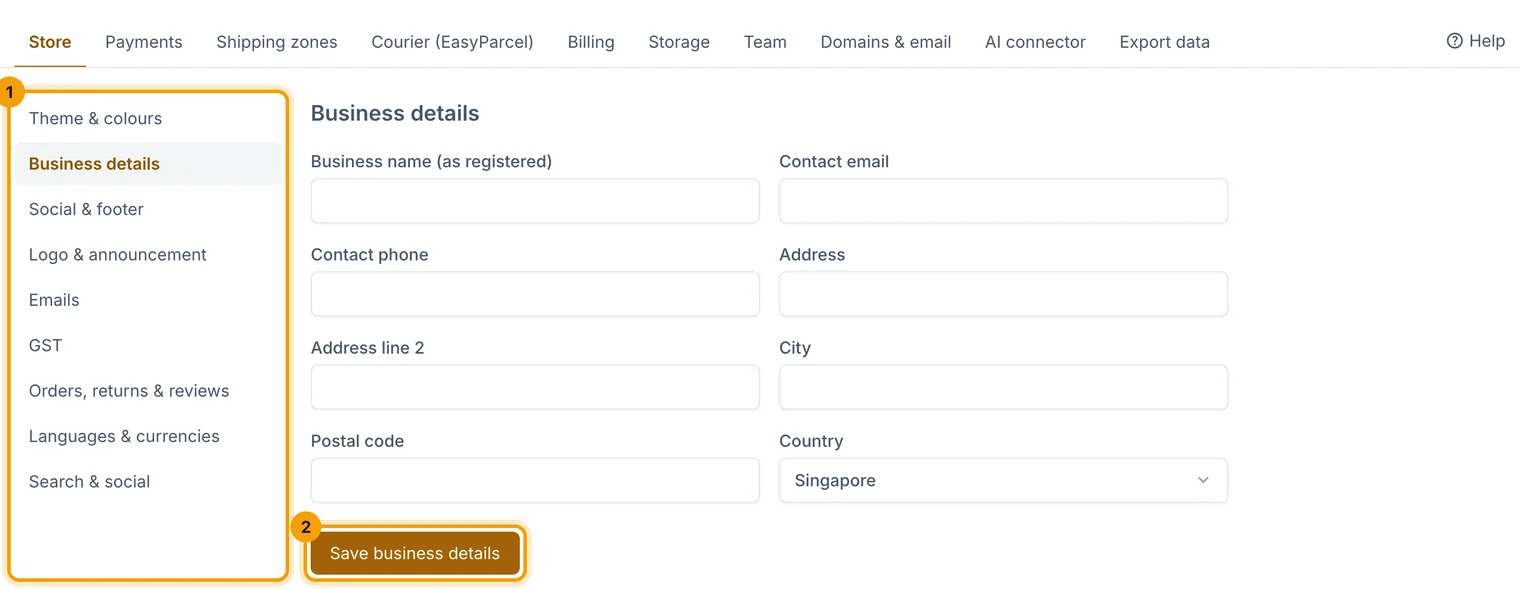
Each section saves on its own, so you can't lose changes in another one.
What's in each section
- Business details: the name on receipts, your contact email and phone, and your address.
- Social & footer: links to Instagram, Facebook and TikTok, a WhatsApp number and the newsletter sign-up text.
- Logo & announcement: your logo, the small icon in browser tabs, and a banner across the top of every page.
- Emails: the name your emails come from, where replies go, and a sign-off.
- GST: see Charge and show GST.
- Orders, returns & reviews: your order number prefix, whether you accept returns (and for how long), the note printed on packing slips, and how reviews work.
- Languages & currencies: extra shop languages and the currencies shoppers can see approximate prices in.
- Search & social: your store description for search engines, the text after every page title, the image shown when your store is shared, and your Google Analytics and Search Console codes (see SEO).
Related guides
- Charge and show GST
If you're GST-registered, show GST at checkout and on receipts and invoices.
- Change theme and colours
Pick a theme and fonts, set your own colours, preview, then publish.
- Get found on Google (SEO)
Your SEO score and checklist, search titles and descriptions with live previews, hiding pages, and fixing broken links.
Still stuck? Contact support or email [email protected]. We reply within one business day.