Refund an order
Give all or part of the money back through Stripe, and choose whether to restock.
Orders · Updated 14 Nov 2026
Refunds go back to the customer's card or wallet through Stripe, from your Stripe balance. Customers usually see the money in 5 to 10 business days.
-
Open the order and choose Refund.
-
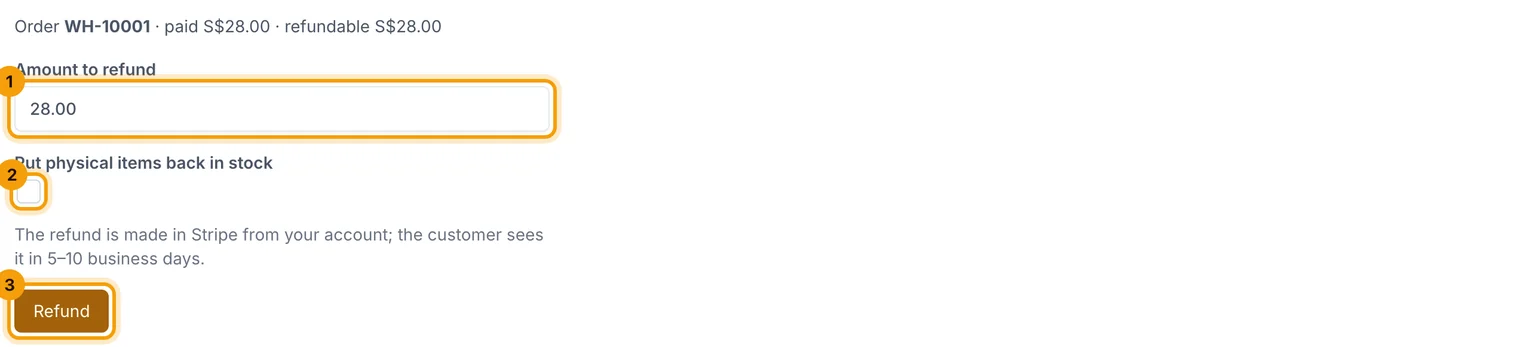
Enter the Amount to refund (1): the whole order or part of it.
-
Tick Put physical items back in stock (2) if the items are coming back and can be sold again.
-
Choose Refund (3).
A refund can't be undone, so check the amount.
Related guides
- Pack and ship orders
Work through orders to ship, print packing slips, mark orders shipped and send tracking.
- Track stock
How stock goes down and up, low-stock alerts, and how to record a delivery or a breakage.
- Store settings
Business details, logo, emails, GST, returns, languages, currencies and search settings, one section at a time.
Still stuck? Contact support or email [email protected]. We reply within one business day.