Use your own domain
Connect a domain you own (yourbrand.com), step by step for Cloudflare, GoDaddy, Namecheap, Route 53 and others.
Domains & email · Updated 14 Nov 2026
Your store always has a free wildhoney.io address. You can also use your own domain, such as yourbrand.com. Your current website keeps working until you change your DNS records.
Add your domain
- Open Online store › Domains & email.
- Under Connect a domain you own, enter your domain and keep Also connect the www version ticked. Choose Add domain.
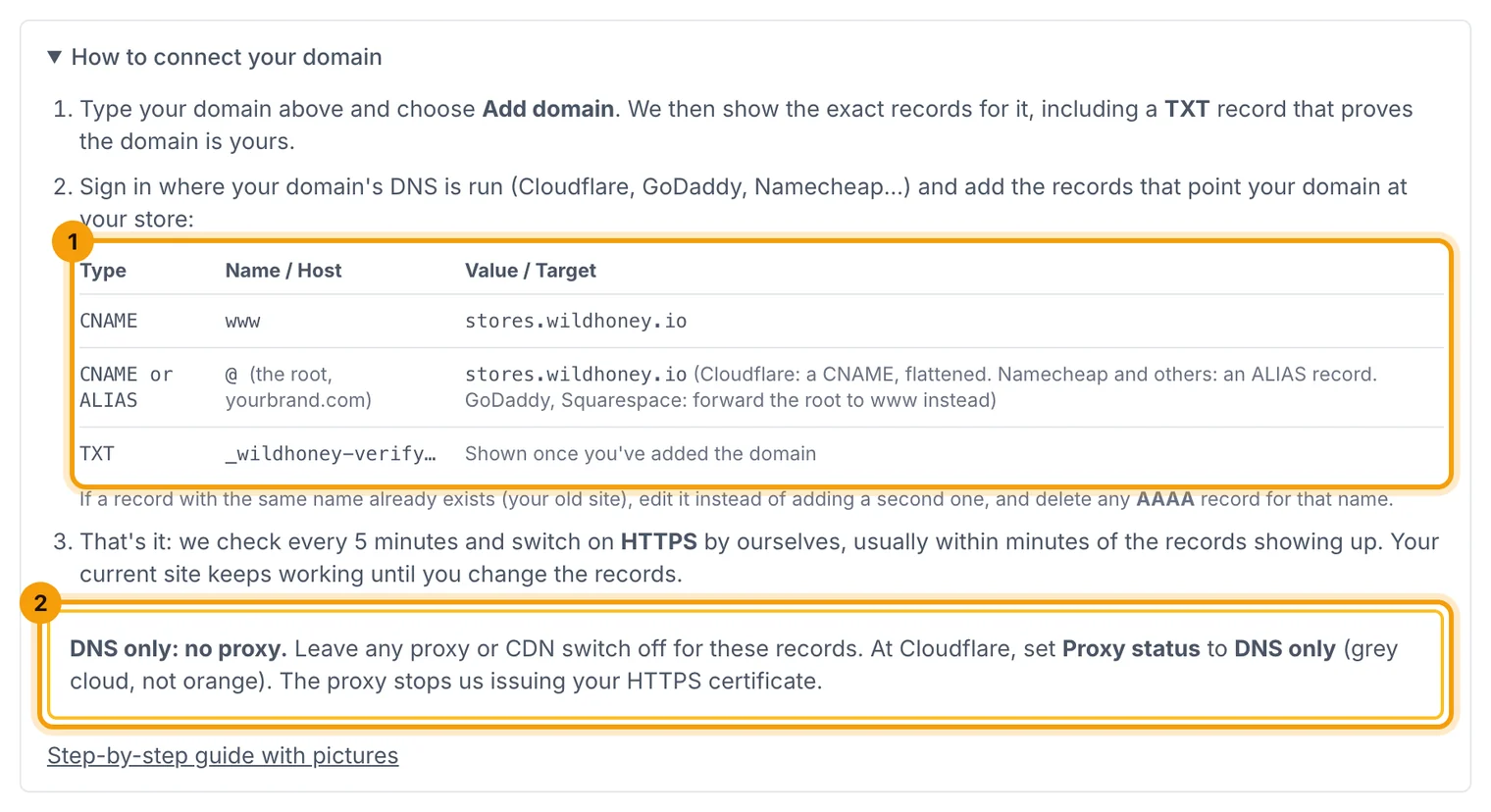
Not sure what's involved? Open How to connect your domain under the box. It shows the kind of records you'll add (1) and the one setting that matters most: DNS only, with no proxy (2).
Add the records
The page shows three steps (1) and the exact records to add (2), with Copy buttons. It also detects who runs your DNS and opens step-by-step instructions for them (3).
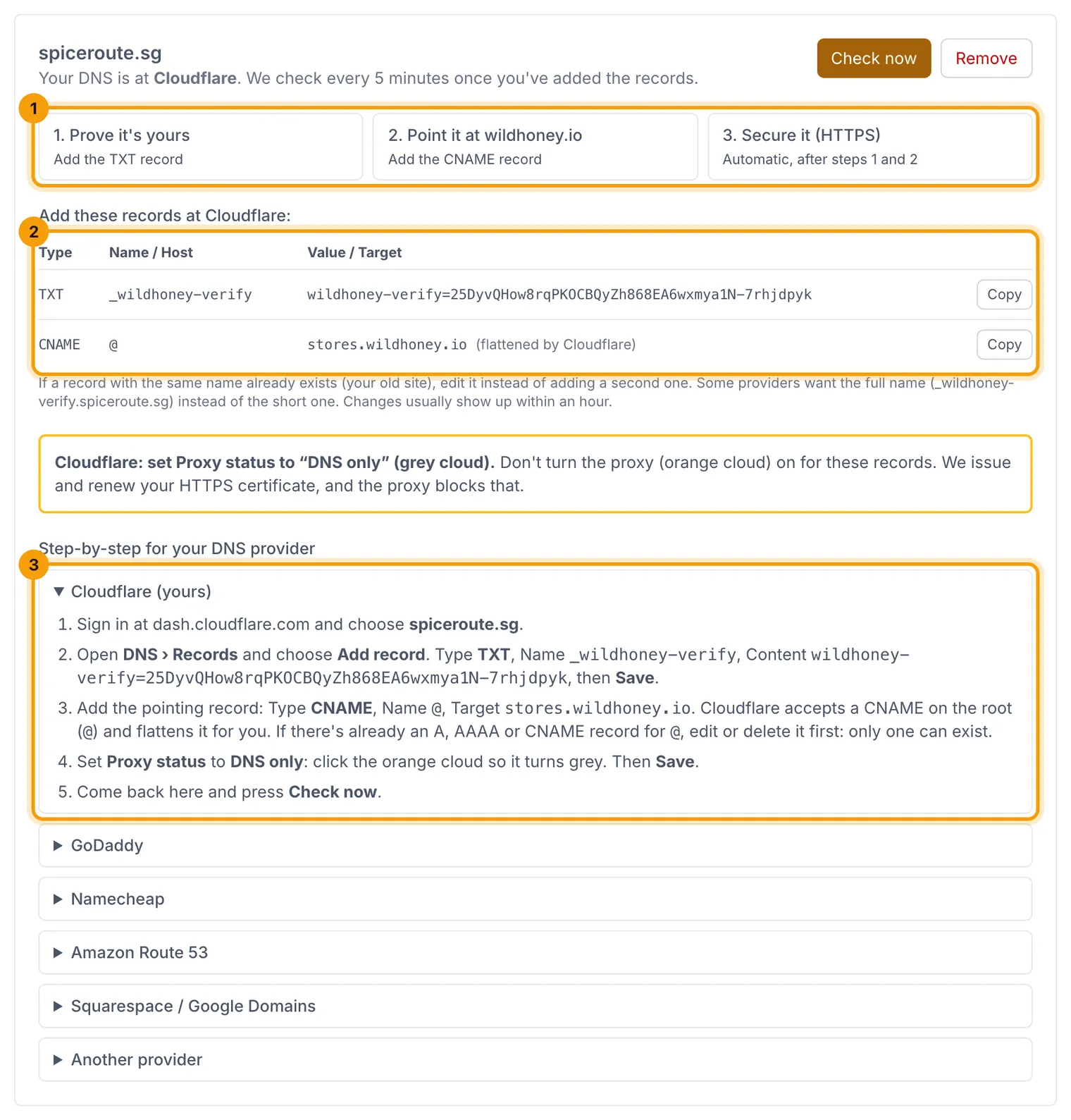
- Prove it's yours: a TXT record.
- Point it at wildhoney.io: a CNAME to
stores.wildhoney.io. - Secure it: HTTPS is set up automatically once both records are in place.
Root domains (yourbrand.com)
DNS rules don't allow a plain CNAME on a root domain, so what you add there depends on your DNS provider. The card shows the right one for yours:
- Cloudflare: a CNAME on
@tostores.wildhoney.io. Cloudflare "flattens" it for you. - Namecheap, Porkbun, DNSimple, Gandi and others: an ALIAS record (some call it ANAME) on
@tostores.wildhoney.io. - GoDaddy, Squarespace and others that have neither: forward yourbrand.com to
https://www.yourbrand.comin your provider's forwarding settings, connect www, and make www your main address. That's why adding a root domain there always adds its www too.
You never point your domain at an IP address, so your store keeps working if we ever move our servers.
If your domain has an AAAA record from your old site, delete it. It would send visitors on IPv6 to the old site.
We check every 5 minutes, or choose Check now. If something's wrong, the card says exactly what, for example "Cloudflare's proxy is on" or "your domain still points to your old site".
Make it your main address
When the domain shows as connected, choose Make main. Your wildhoney.io address and www then redirect to it.
After it's connected
Each connected domain shows its status: Ownership verified, Points to your store (or Forwards to www for a forwarded root) and HTTPS (1), with when it was last checked. Choose Check again (2) after changing anything at your DNS provider.

We re-check connected domains every 6 hours. If one stops reaching your store, for example because a record was deleted or Cloudflare's proxy was switched on, the card says what to fix, and we email the store owner if it lasts more than a few hours.
The DNS records section shows what to keep at your DNS provider. The CNAME or ALIAS record (or the forwarding) is what keeps the address working. The TXT record only proved the domain is yours, but leaving it in place is harmless.
Related guides
- Get found on Google (SEO)
Your SEO score and checklist, search titles and descriptions with live previews, hiding pages, and fixing broken links.
- Store settings
Business details, logo, emails, GST, returns, languages, currencies and search settings, one section at a time.
Still stuck? Contact support or email [email protected]. We reply within one business day.