Connect Stripe
Take card, Apple Pay and Google Pay payments straight into your own Stripe account.
Payments · Updated 14 Nov 2026
Customers pay you through your own Stripe account, and Stripe pays out to your bank. wildhoney.io never holds your money and takes no cut of your sales.
New to Stripe
-
Open Settings › Payments and choose Create a Stripe account (1).
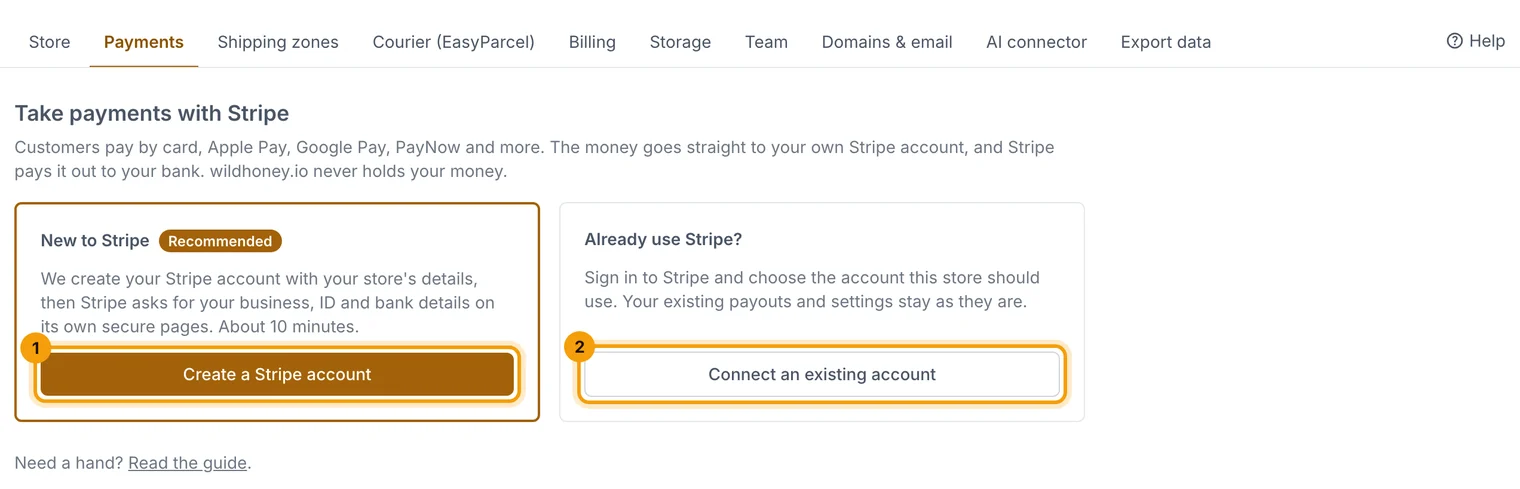
Create a new Stripe account or connect one you already have. -
We start the account with your store's details. Stripe then asks for your business details, ID and bank account on its own secure pages (about 10 minutes).
-
If you stop halfway, come back to Settings › Payments and continue.
Already use Stripe
Choose Connect an existing account (2), sign in to Stripe and pick the account for this store.
Where you stand
The Payments page shows one of these:
- Verification needed: customers can't pay yet; the page lists what Stripe is waiting for.
- Payments on · payouts pending: you can sell; Stripe holds payouts until your bank details are confirmed.
- Ready to take payments.
Choose Check again after finishing something in Stripe, or Open Stripe Dashboard to see payments and payouts.
Related guides
- Take PayNow, GrabPay, Apple Pay and Google Pay
Turn on more ways to pay in your Stripe Dashboard; they appear at checkout automatically.
- Charge and show GST
If you're GST-registered, show GST at checkout and on receipts and invoices.
- Launch checklist
What your store needs before it can go live, and how to launch it.
Still stuck? Contact support or email [email protected]. We reply within one business day.