Shipping zones and rates
Group the countries you post to, set prices by weight, offer free delivery over an amount, and block products from some countries.
Shipping · Updated 14 Nov 2026
A shipping zone is a group of countries that share the same prices, such as Singapore, or Malaysia with Brunei. Checkout shows only the rates that fit the customer's country and parcel weight.
Add a zone
-
Open Settings › Shipping zones and choose Add shipping zone.
-
Give it a name and pick its countries.
-
Add one or more rates: a name customers see (Standard, Express), the weight range it covers, the price, an optional free delivery amount, and the delivery time in days.
-
Choose Save.
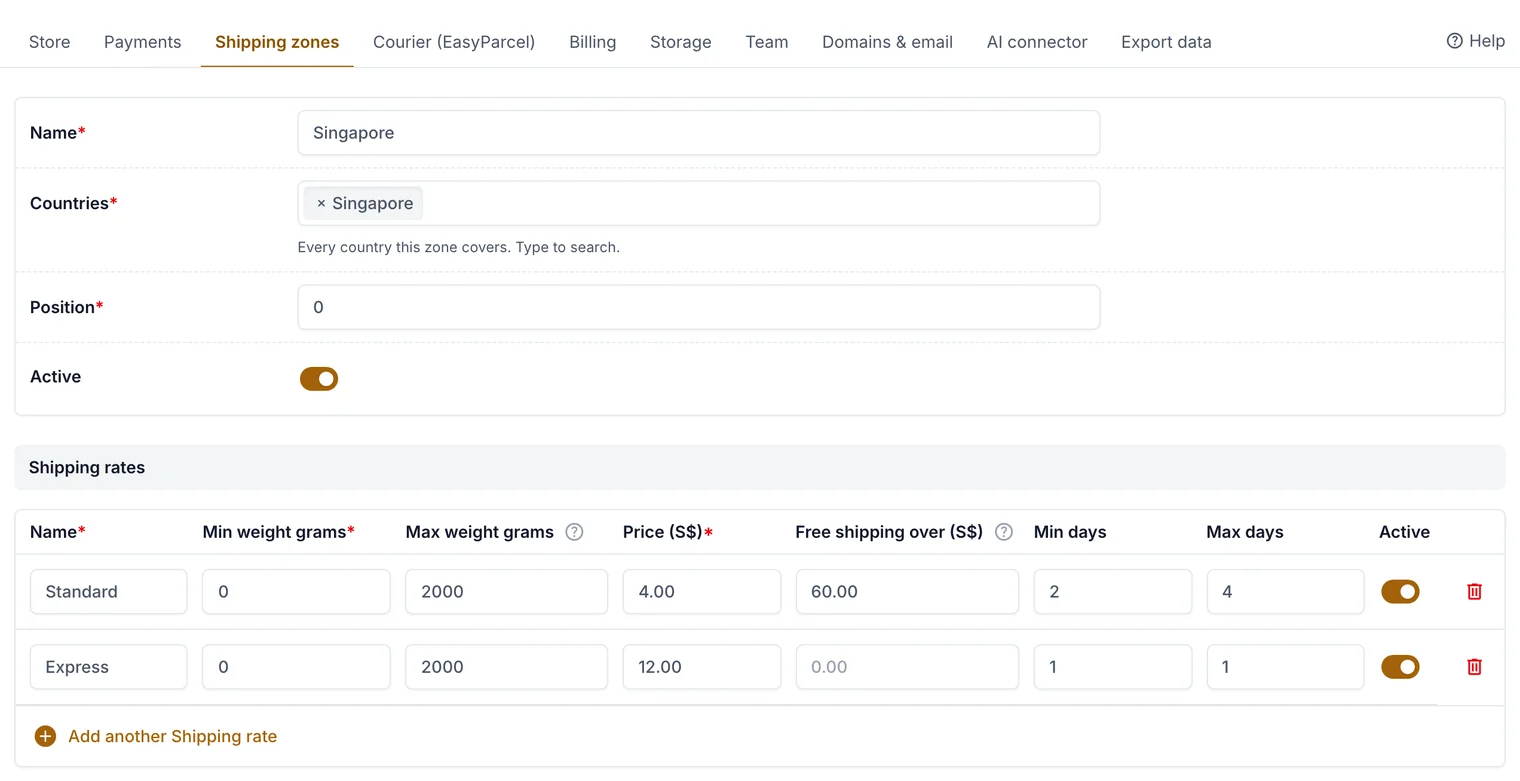
Rates by weight, free delivery over an amount, and delivery days.
Stop a product going to some countries
Some countries restrict food imports (Australia, for example, is strict about seeds and spices). On the product, open Shipping limits and pick the zones it can't go to. Checkout explains why if a customer's basket includes it.
Related guides
- Shipping to Singapore and Malaysia
A worked example: rates for Singapore and for Malaysia and Brunei.
- Book couriers with EasyParcel
Connect your EasyParcel account, compare couriers and book pickups from an order.
Still stuck? Contact support or email [email protected]. We reply within one business day.